
Views: 0 Author: Site Editor Publish Time: 2026-02-17 Origin: Site


Car keys have evolved far beyond the simple mechanical devices they once were. With advancements in technology, many vehicles now use electronic key fobs that allow for remote locking, unlocking, and even starting the engine with just the push of a button. However, like any electronic device, these key fobs rely on batteries that eventually lose their charge. When your car key starts to lose signal strength, or the buttons no longer respond, it's often a sign that the battery needs replacing. In this article, we’ll walk you through how to replace your car key battery, ensuring you get your key working again in no time.
At WEKI International Trade Co., Ltd., we’ve been offering reliable car key replacement batteries and accessories for years. Our experience has allowed us to develop a strong understanding of the importance of maintaining your car key’s performance, so we’re sharing our expert tips on how to easily replace your key fob battery. By following our guide, you can save time and money while restoring your key to full functionality.
Before diving into the replacement process, it’s important to understand what type of battery your car key uses. Car key fobs typically use small coin cell batteries that can be found in most electronics. The most common batteries used for key fobs are the CR2032 and CR2025 models, but the exact type can vary depending on your car's make and model. It’s essential to use the correct battery to ensure your key fob works properly.
Additionally, knowing how long your car key battery lasts is useful for proactive maintenance. Most key fob batteries typically last between 2 to 4 years, depending on usage and environmental conditions. Once you start noticing a decrease in performance, it’s time to replace the battery before it completely dies.
Replacing a car key battery is a simple process that requires very few tools. Here’s what you’ll need:
Tool | Description |
Small Flathead Screwdriver | For prying open the key fob. |
New Car Key Battery | Ensure you get the correct type (e.g., CR2032, CR2025). |
Tweezers | For handling the small battery. |
Having these tools on hand will make the process smooth and easy. While some car keys may require additional tools like a Torx screwdriver, most standard key fobs can be opened with a flathead screwdriver.
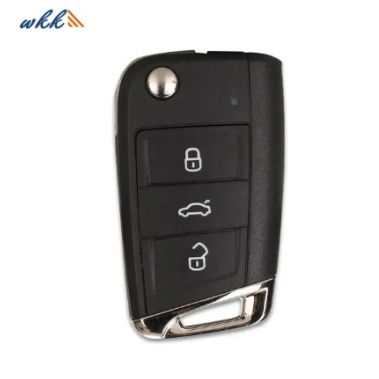
Replacing the battery in your car key fob may seem like a small task, but it’s essential to ensure your key fob operates correctly. Over time, the battery in your key fob will naturally lose power, affecting its ability to lock or unlock your car, open the trunk, or start the engine remotely. In this guide, we will walk you through a step-by-step process on how to replace your car key battery, ensuring that it works as good as new.
Check your key fob’s model number or consult your vehicle’s manual to determine the type of battery you need. As mentioned earlier, most car key batteries are coin-cell models like CR2032 or CR2025. These are easily available at most electronic and hardware stores. If you're unsure, you can always visit the manufacturer’s website or contact us at WEKI International Trade Co., Ltd., where we can assist you in finding the exact match.
To replace the battery, you need to open the key fob. Start by locating the seam where the two halves of the fob meet. Most fobs are designed to snap open easily. Insert the small flathead screwdriver gently into the seam and twist slightly to separate the two halves. Be careful not to apply too much force, as the plastic casing can crack if overexerted.
Once the key fob is open, you should be able to see the old battery. Use tweezers to carefully remove the old battery from its compartment. Take note of how the battery is positioned, paying attention to the positive (+) and negative (-) sides. This will help you correctly insert the new battery later.
Insert the new battery into the compartment, ensuring it matches the orientation of the old battery. The positive (+) side of the battery should be facing up (or down, depending on your key fob’s design). Press the battery gently into place, making sure it fits securely in the compartment.
Once the new battery is in place, snap the two halves of the key fob back together. Apply slight pressure to ensure the fob is sealed tightly. You should hear a click or feel the fob snap into place when it's properly closed. If your key fob has screws, use the appropriate screwdriver to reattach them.
After replacing the battery and closing the key fob, test its functionality. Press the buttons to check if the remote locking, unlocking, and other functions are working. If everything works as expected, you’ve successfully replaced the battery! If the fob isn’t responding, make sure the battery is correctly installed and try again.
Replacing the battery is only part of maintaining your car key fob. Here are a few tips to help ensure your key fob stays in good working condition:
Avoid dropping your key fob: A fall can damage the internal electronics or the casing of the fob, leading to malfunctions.
Keep it clean: Dirt, dust, and moisture can affect the performance of your key fob. Wipe it down regularly with a soft cloth.
Check the battery life: Even if your key fob is still working, it’s good practice to monitor its battery life and replace it before it dies completely.
Knowing when to replace your car key battery can save you the hassle of dealing with a completely dead fob. Here are a few signs that it’s time for a new battery:
Weak Signal or Reduced Range: If your car key’s range starts to diminish, it might be a sign that the battery is running low.
Unresponsive Buttons: If pressing the buttons on your key fob doesn’t unlock or lock your car, it's time to replace the battery.
Warning Light on the Dashboard: Some vehicles display a warning light when the key fob battery is low.
Frequent Need to Replace the Battery: If the battery wears out every year or sooner, it could be worth checking the type or brand of battery you're using.
Replacing your car key battery is an easy process, but if you want to extend the battery’s lifespan, here are a few tips:
Avoid exposing your car key fob to extreme temperatures, as heat and cold can damage the battery inside. Store your fob in a dry, cool place when not in use to prolong the battery’s life.
Some key fobs have additional features like panic buttons or remote start capabilities. If you’re not using these features regularly, consider turning them off to save battery life.
Maintaining the physical condition of your key fob can also improve battery life. Periodically clean your key fob with a damp cloth to remove dirt, grime, or oils from your hands. This can prevent damage to the buttons and the internal components, ensuring your key fob functions properly for a longer period.
Replacing the battery in your car key is an essential part of maintaining a reliable remote entry system. By following these simple steps, you can quickly and efficiently restore functionality to your car key fob and avoid unnecessary downtime. At WEKI International Trade Co., Ltd., we offer high-quality replacement batteries for all types of car key fobs. Our commitment to providing the right products ensures that your key fob will continue to perform at its best.
If you're looking for the perfect replacement battery or have any questions about car key maintenance, we invite you to reach out to us at WEKI International Trade Co., Ltd. Our team is here to help with expert advice and product recommendations. Contact us today for more information on how we can assist with your car key battery needs.
The easiest way to find the correct battery is to check the key fob's user manual, or you can also remove the old battery to check the model number.
Yes, replacing the battery in your car key is simple and can usually be done with a small screwdriver and tweezers.
Car key batteries typically last 2-4 years, depending on usage and environmental factors.
Make sure the new battery is inserted correctly and that the key fob is properly closed. If it still doesn’t work, check the battery to ensure it’s fresh or consult a professional.
 WhatsApp


